Customize Yagi Mechanical® to fit how you use it by going to the Options in the View menu. Below is an image showing each tab and detail on all of the included settings. Make sure to click Save before closing the window to apply your changes. Using the Reset button will undo any changes you have made since opening the options window.
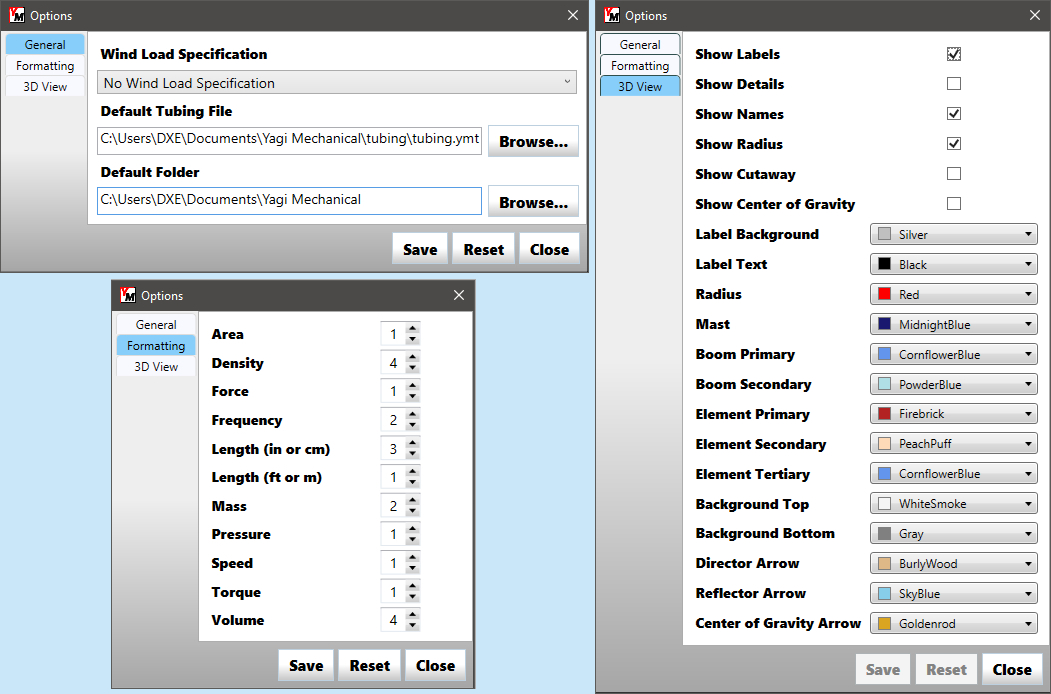
General Options
- Wind Load Specification - Use this menu to choose which wind spec should be your default when creating a new design. See Choosing a Wind Spec for more detail.
- Default Tubing File - YM creates a default tubing file in your user directory when installed, but you can make a copy, rename, and edit it if needed - then set it as your default.
- Default Folder - This location will be shown whenever files are loaded or saved in YM - you can set a different default directory if you keep your design files elsewhere.
Formatting Options
All of the settings in this section are used to tell Yagi Mechanical® how many decimal places you would like displayed for different values.
3D View Options
The checkboxes here determine the default visibility of items on the 3D View. If you always want to see the Cutaway view or always want the Labels off, you can set that here.
Below the checkboxes are several color selectors for different parts of the 3D View. These color options give a large amount of flexibility to adapt the display to fit your needs.