After the Yagi Mechanical® splash-screen you will find yourself at the Antenna Design tab. It serves as an overview of the currently loaded antenna design and its calculated values.
Below is a listing of all of the fields found in this tab, along with a description for each and an image showing where you can find them.
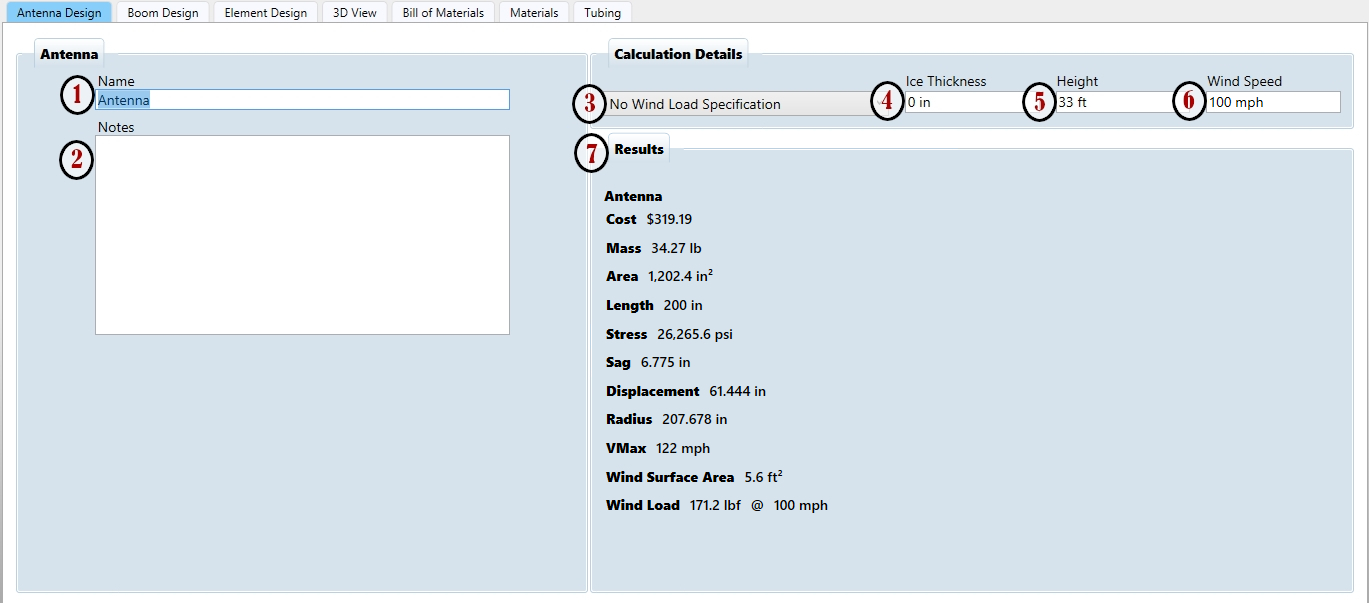
- Antenna Name - Give your design a descriptive name.
- Notes Field - Enter useful information about this antenna for future reference.
- Wind Load Specification Menu - This menu allows you to select what specification to use when calculating wind stresses. See the section on Choosing a Wind Spec for information about the standards included in Yagi Mechanical® and which you should use for your design.
- Ice Thickness Field - Enter a thickness of radial ice to use in wind load calculations if you are designing for a cold weather environment.
- Height Field - Some of the Wind Specs use the mounting height for stress calculations, enter in a value here for more accurate results.
- Wind Speed Field - While the Results Pane will show the maximum wind speed where all parts of the antenna are within their material’s yield stress, you can set a specific wind speed here to see resulting calculations for that amount of wind.
-
Results Pane - Here you can view all of the results from the whole design’s stress calculations. Below is a listing for each of these items:
- Cost - Estimated material costs for tubing included in this design. Tubing loaded from the DXE website will include pricing for available parts, but cost for other tubing parts can be entered manually in the Tubing tab.
- Mass - This gives the total weight of all tubing used in the design.
- Area - Here you can see the total wind area of the antenna.
- Length - Shows the largest dimension of the antenna (either boom length or length of longest element).
- Stress - YM gives the maximum stress value across all elements and the Boom for the given wind load specification and wind speed.
- Sag - This shows the maximum sag, Boom plus Element, from the Boom Mounting Point.
- Displacement - From the Mounting Point, this gives you the maximum lateral displacement of the Boom plus Elements.
- Radius - The longest distance on the antenna from the Mounting Point is the turning radius of the design.
- VMax - Based on the current wind load and speed settings, this is the maximum estimated speed that can be withstood before tubing deforms permanently or breaks. Yagi Mechanical® stops calculating when stress is within 1% of the material’s yield strength or if it hits 999 mph.
- Wind Surface Area - This gives you the max area that can be perpendicular to the wind (either the boom or the combination of all elements) as a worst case when planning for mounting it on a fixed or rotating mast.
- Wind Load - Using the wind speed currently set in the design, YM calculates the moment exerted on the mast by the load from the wind.
Note: Some manufacturers refer to Wind Load when Wind Surface Area is what they actually provide - match up the units to make sure of a direct comparison for mast calculations!