As you make changes to your antenna design, Yagi Mechanical® works in the background to compile a listing of all the pieces of tubing needed to construct it. The Bill of Materials tab shows you the result of this process and also allows you to save a PDF that you can reference later on outside of the program.
Below is an example report with each of the different sections labeled and detailed. Please also check the Tubing tab documentation for information on creating Parts that can be used by YM as it creates the Bill of Materials - we recommend you read through that section first as it will make it easier to understand how it is used here.
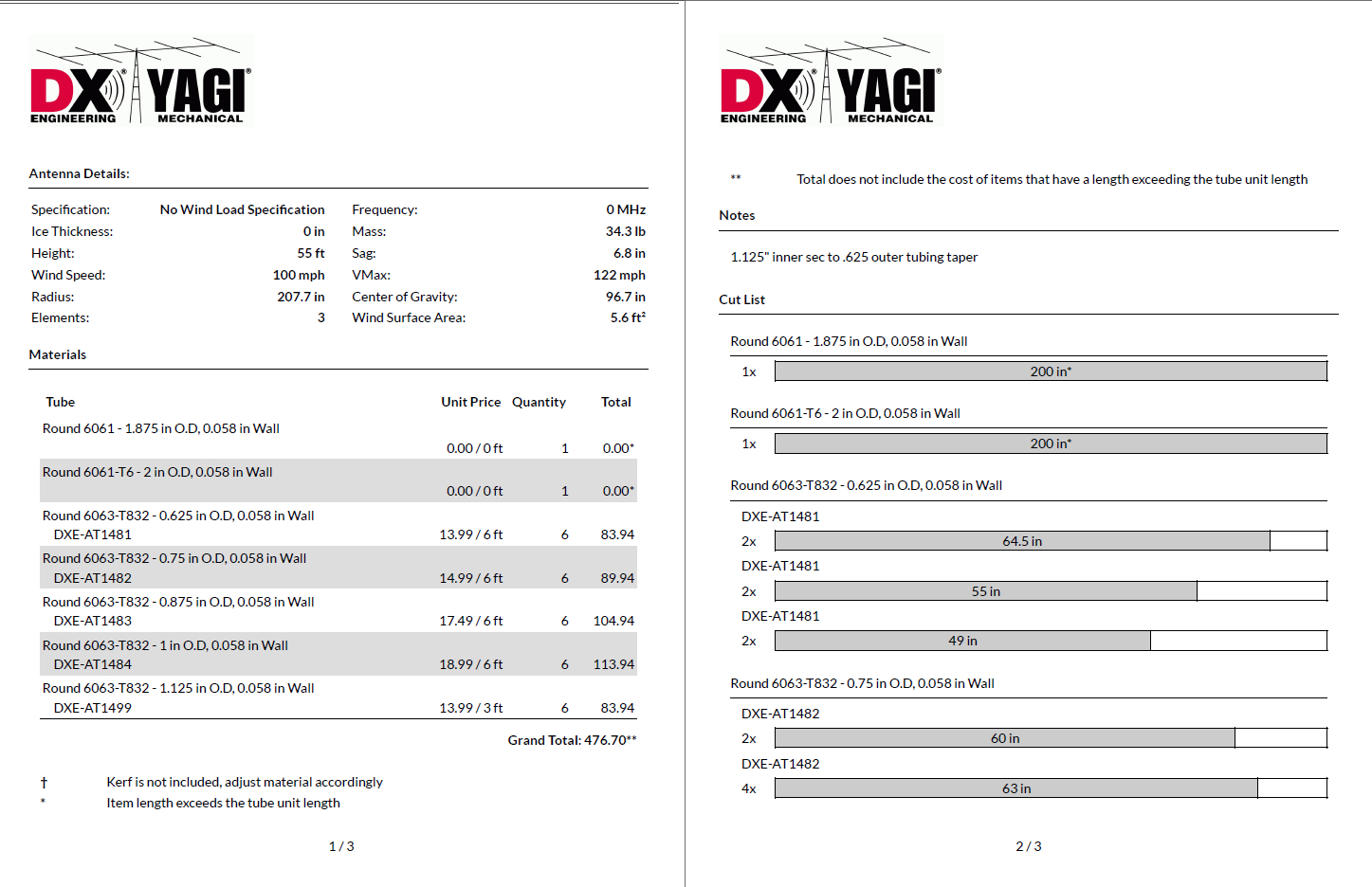
- Antenna Details - Some summary information on your design is shown here: weight, number of elements, radius, maximum wind speed, and more. If a Driven Element is selected in the Element Design tab its resonant frequency will be shown here.
- Materials - This section lists all of the unique tubing types and sizes that are used in the current design. If you have Parts defined that fit the needed sections the list will show how many pieces should be ordered and estimate line item and total pricing.
Note: As shown below the Materials list, kerf (the material lost in the cutting process) is not included in the calculated dimensions.
- Notes - Yagi Mechanical® will include notes entered in the Antenna Design tab.
- Cut List - For each of the different tubing sizes shown in the Materials list, the Cut List shows what lengths should be cut and how many of each are needed to build the current design. Where Parts are not available to YM for the given Tubing cut detail will not be shown, just the lengths is use.
Note: Using the Vertical BOM checkbox will generate the Bill of Materials assuming the half element design specified in the Element Design tab is being constructed and used as a vertical element. This means including half of the materials for any defined elements and ignoring any specified Boom.
While Yagi Mechanical® does not do a different calculation for the stresses on a vertical compared to a horizontal element, the wind stresses would be the same and the stresses from weight would be less of a consideration since they would be applied along the element without wind and only partially added to wind stresses as the element is deflected. In other words, the same calculations could be used for a vertical - treating them as including a small additional safety factor.
While Yagi Mechanical® does not do a different calculation for the stresses on a vertical compared to a horizontal element, the wind stresses would be the same and the stresses from weight would be less of a consideration since they would be applied along the element without wind and only partially added to wind stresses as the element is deflected. In other words, the same calculations could be used for a vertical - treating them as including a small additional safety factor.